Frequently Asked Questions
Short answers to the things people ask most. For step-by-step instructions, see the User Guide; for fixes, see Help.
Version 2.0
What changed in 2.0?
Version 2.0 is a complete rewrite of the app — faster and smoother throughout, with a cleaner look and no background image behind the screens. Everything you used before is still there: the same food database, ring, trends, recipes, favorites, barcode scanning, PDF reports, and backups. On top of that, 2.0 adds menu scanning (Pro), a one-tap batch lookup for every ingredient still missing a value, online lookup, a prepared-dish builder and product scanning inside Food Management, a recipe search that retries reworded names, and a consent dialog before every online lookup. Your history is now also part of your device's Google backup.
Will updating keep my data?
Yes. 2.0 installs as a normal update. The first time it opens it copies your logs, foods, favorites, recipes, and settings across automatically and verifies the counts. The original data is kept on the device rather than deleted, so nothing is lost either way. Backup files exported by earlier versions still restore in 2.0.
Do I still need a backup file if my phone backs up to Google?
Since 2.0 the app's data is included in Android's Google backup when that is enabled on your device, and it comes back when you set up a new phone with the same Google account. A backup file (Settings → Back up to file…) is still useful as a copy you control, to move data between Google accounts, or to keep a snapshot before you experiment. Restoring a file is never locked.
Getting started
What is Trace Elements for?
It helps you track how much of a chosen trace element — nickel by default — you take in through food each day, and compare your daily total against a limit you set. It's designed for people following a restricted diet who want to spot high-content foods and watch for patterns over time.
Which elements can I track?
The app ships set up for nickel, the element with the most complete built-in food data. Cobalt is available with Trace Elements Pro: switch between them with the Nickel and Cobalt chips in Settings. Each element keeps its own daily limit and its own set of food values, and cobalt values are shown in nanograms (ng) to match the published low-cobalt sheets. Whichever element you pick is the outer ring; the other keeps running as an inner ring on the same day.
Do I need an account or an internet connection?
No account, ever. The app works fully offline using its built-in food list. A connection is only used if you choose to look up a food, dish, or product the app doesn't already know — and it asks before sending anything (see privacy).
Values & calculations
What do the numbers mean — µg and µg/100g?
Food reference values are stored as micrograms (µg) of the element per 100 grams of food (nanograms for cobalt). When you log an amount, the app scales that figure to what you actually ate. For example, a food listed at 500 µg/100g, eaten as a 30 g serving, contributes 500 × 30 ÷ 100 = 150 µg to your day.
Why is there just one entry per food?
Earlier builds listed a separate row per country — for example cashews (Spain) and cashews (USA, national) — which made the list long and hard to read. Each food is now a single entry whose value is a weighted average of every measurement in the source data across all regions. Trace-element content still varies with soil, cultivar, and processing, so if you know a figure that fits what you ate better, you can edit it yourself in Food Management (see Can I correct or add a value? below).
How accurate are the values?
Treat them as ballpark guidance, not lab results. They are population-level estimates; the actual content of any single serving varies with origin, cultivar, soil, processing, and preparation. They're meant to help you compare foods and notice patterns, not to certify an exact intake.
Can I correct or add a value?
Yes. In Food Management, type the food name, enter a number in the µg / 100g field, and tap Save to DB. Your value is stored locally for the element you're tracking and used everywhere that food appears. You can also edit any entry in place from View & Manage Food Database.
How does the online lookup work, and can I trust it?
When you type a food the app doesn't know, a look-up row offers Find value online. After you confirm, the app opens Google in-app and reads its AI Overview for the food — more than once. It only keeps a reading that sits next to both the tracked element and your food's name, treats a range as its midpoint, and retries other word orders if the first finds nothing. It then shows every reading and the sentence the value came from; if the readings disagree, you pick one or none. A reading above the AI lookup verify-above value in Settings never decides the result: it is set aside, listed as ignored, and only offered — flagged in red — if nothing else was read at all. Treat any online value as an estimate — you always confirm before it's saved.
What's a "compound food" and how is its total worked out?
A compound food is a dish made of several ingredients — like a sandwich or a burger. The app holds a recipe of ingredient names and standard portions, looks up each ingredient's value, and sums them into the dish total. You can also build your own in My Recipes and adjust portions or swap ingredients to lower the total. For a cooked dish that isn't in any recipe list, tick Compound dish — build from ingredients in the meal card (or Prepared dish — look up ingredients online in Food Management) and tap Find ingredients online: the app pulls its typical ingredients from TheMealDB to estimate a total you review before saving. Ingredients it can't price are kept and shown at 0.0 so nothing is silently dropped — Look up all missing prices them in one pass, or fill them in yourself. See the User Guide.
How does barcode scanning work, and why are the amounts estimates?
Scanning reads the product's barcode with your camera and fetches its ingredient list from Open Food Facts (or USDA's branded-food data as a fallback on builds that include a key). Packaged labels list ingredients by weight but rarely state exact quantities, so the app portions them from the label's own composition estimates over one serving (or 100 g) — the first ingredients carry the most weight. That makes every scanned amount an estimate to review: adjust any portion before logging. Ingredients your database can't price are looked up automatically right after the scan, and the product is saved to My Recipes, linked to its barcode, so rescanning it later is instant and offline — with whatever amounts you tuned. See the User Guide.
How does menu scanning work?
Tap Scan menu in a meal card, confirm the consent, and photograph the menu section with your dish. The text is recognized on your phone — the photo is never uploaded and is deleted as soon as it has been read. Pick your dish from the Which dish? list; the app then matches it against your recipes and food list, and if needed sends only that dish name to TheMealDB for its ingredients, which land in the compound builder with estimated portions. Menu scanning is part of Pro.
Can I share recipes, reuse a previous day's meals, or fix a meal logged on the wrong day?
Yes to all three. On the My Recipes screen, every recipe has a share icon: send it as a recipe file to someone with Trace Elements (it lands in their app, recalculated from the food data on their phone) or as text to anyone. A preview shows exactly what goes out, and it never includes your logs or journal. To move all your recipes at once, the export icon saves them to one file and the download icon opens one, adding the recipes without overwriting your own. In any meal card's header, the copy icon pulls that same meal from the day before into today, one meal at a time — and the move icon next to it sends the whole meal to a day you pick, the one-step fix for "I logged this on the wrong date". See the User Guide on sharing recipes and reusing and moving meals.
Can I import recipes from a website, a cookbook, or a recipe card?
Yes. On My Recipes, the import icon opens three ways in: Web (paste a recipe page's address, or share the page to the app from your browser), Paste (any recipe text), and Scan (photograph a recipe card or cookbook page, up to six pages, or pick photos you already have). Web pages are loaded by your phone itself, and only the recipe is kept. Scans are read on your phone and never uploaded. Before anything is saved, Review recipe shows each line next to what the source said, flags anything the app is unsure about (handwriting, or "butter the size of an egg"), and lets you fix, reorder, or add lines. Then the app looks up the values. Importing from the web or pasted text is free; scanning is part of Pro. See the User Guide.
How do grocery lists work?
Tap the cart icon on My Recipes, start a New list, and tick the recipes you're cooking, with the servings you want. The app combines the ingredients into one list grouped by aisle, and each line says which recipes need it. Hide spices and pantry staples with a tap, swipe a line away when you already have it (or mark it as something you always have), and switch to shopping mode for big checkboxes at the store. Lists save as you go and work offline. Sharing a list as text is free; printing it or saving it as a PDF is part of Pro. See the User Guide.
Reading the app
What do the ring and calendar colors mean?
The ring, the Trends week and month views, and the PDF report all use the same rule: amber at your Caution threshold and red at your Over-limit threshold, set in Settings (80% and 100% of the limit by default). When you track both elements, a day in Trends is colored by whichever element did worse, and the month view adds a Ni↑ or Co↑ badge naming it.
Can I change my daily limit and the warning thresholds?
Yes — they live in Settings: the daily limit (one per element — switch the chip to set the other), the Caution threshold (percent of the limit at which the ring and Trends turn amber), and the Over-limit threshold (percent for red). Set them to match the targets your clinician or diet plan uses.
Can I export my history?
Yes. On the Trends & History screen, the PDF icon exports a report for a date range you choose — each day's total and status, its mood and note, and every food logged — that you can save or share, handy to bring to a clinic visit. You can also create a full data backup file in Settings → Backup & Restore. Both are part of Pro, and both stay free on devices that had the app before Pro launched.
Pro & purchases
What's free, and what does Trace Elements Pro add?
Everything you use for day-to-day tracking is free and stays free: logging meals, the daily ring, the nickel food database and online lookups, barcode scanning, recipes, importing recipes from the web or pasted text, recipe sharing, grocery lists, favorites, trends, the journal, and restoring a backup. Trace Elements Pro adds the features around the edges: tracking cobalt side by side with nickel, menu scanning, recipe-card scanning, PDF report export, printing grocery lists, and backup to a file. It's $1.99/month or $12.99/year through Google Play, and the subscription helps fund keeping the food data current. Cancel anytime in Play's subscription settings — the app never handles your payment details. There's no paywall screen: a locked control shows a lock, and tapping it explains what Pro adds with a Not now button.
I was using the app before Pro existed — did I lose anything?
No. If you installed the app before Pro launched, PDF reports and file backup stay free on that device, permanently — thanks for being an early tester. Printing a grocery list or saving it as a PDF counts as the same feature, so it's free there too. Cobalt tracking, menu scanning, and recipe-card scanning arrived with or after the paid tier, so those are Pro for everyone.
What's the tip jar?
One-time tips on the Pro & Tip Jar screen — $1.99, $4.99, or $9.99 — for people who just want to say thanks. Tips don't unlock anything and never recur; they're purely support for development and the food-data work.
How do I get Pro back on a new phone?
Install the app, sign in to the same Google account, and tap Restore purchases on the Pro & Tip Jar screen — it's free and always available. Restoring your data from a backup file is never gated either, so a grandfathered early user moving phones can always load their own backup.
What about iPhone?
Trace Elements 2.0 is on the App Store. It's the same app as Android, built from one codebase: core tracking is free, Pro is the same optional subscription, and the optional backup goes to your own iCloud instead of Google Drive.
Privacy & data
Where is my data stored? Is anything uploaded?
Your daily logs and food database live on your device. Nothing is uploaded to any server operated by the app's developer. The only network requests are optional lookups you trigger yourself, and since 2.0 every one of them asks first with a dialog that says exactly what will be sent: the in-app web lookup sends a search query to Google; the prepared-dish and menu-scan lookups send a dish name to TheMealDB's public recipe API; scanning a barcode sends only the barcode number to Open Food Facts (with USDA as a fallback); and the USDA FoodData Central lookup, on builds that include a key, sends the food name to USDA's public API. After a barcode or menu scan, any ingredients still missing a value are looked up by name through the same in-app web search — the scan's consent dialog tells you so before you scan. A product you've scanned before doesn't even do that: it loads from your saved copy, fully offline. When you import a recipe from a web page, your phone loads that page directly, once, the way a browser would; nothing passes through a server of ours. Recipe-card scans are read on the phone and never uploaded, and a recipe you share leaves only through your phone's share sheet, to the person or app you pick.
What happens to a menu photo?
It stays on your phone. The text is recognized by an on-device model, the photo file is deleted immediately afterwards, and neither the image nor the full menu text is sent anywhere. Only the name of the dish you pick from the list can go online, and only if it isn't already in your recipes or food list.
What happens to a recipe-card photo?
It's read on your phone, by the text recognition built into it and, on phones that have one, the phone's own AI model. Nothing is uploaded. Unlike a menu photo, the scan is kept with the recipe in the app's private storage so you can check the recipe against the card later, and it's deleted when you delete the recipe. It's only included when you share the recipe if you switch Include the scan on.
Where do the food values come from?
Nickel-in-food values are adapted from the Rebelytics R&D Inc. low-nickel-diet dataset, and cobalt values from its low-cobalt-diet dataset, both used under the Creative Commons Attribution 4.0 International (CC BY 4.0) license. Values were taken from the published summary tables, normalised to µg (or ng) per 100 g, and mapped to ingredient names for offline lookup. No Rebelytics-branded interface, scoring system, or clinical guidance is reproduced. Optional supplementary lookups use USDA FoodData Central, which is public domain in the United States.
How do I move my data to a new phone?
If Google backup is on, set up the new phone with the same Google account and your history comes back with the app. Otherwise, on the old device open Settings → Back up to file… and save the file somewhere you can reach later (such as Google Drive); on the new device, install the app and use Settings → Restore from file… to load it. Restoring replaces any data already in the app on the new device.
Medical disclaimer
Is this medical advice?
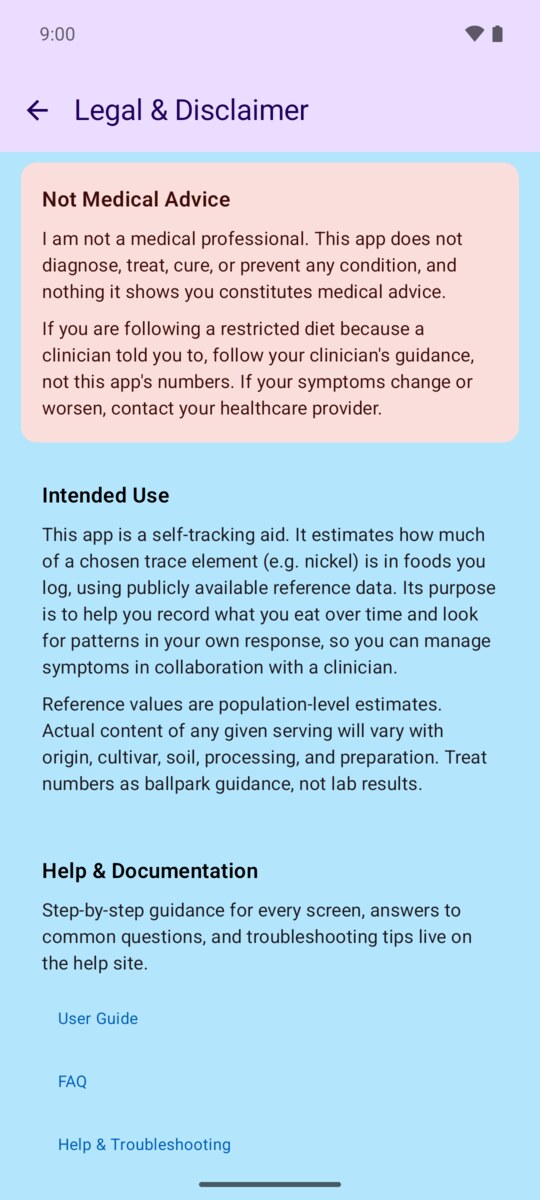
No. Trace Elements is a self-tracking tool, not a medical professional or device. It does not diagnose, treat, cure, or prevent any condition, and nothing it shows constitutes medical advice.
It estimates how much of a chosen trace element is in foods you log, so you can look for patterns in your own response and manage symptoms in collaboration with a clinician. Reference values are population-level estimates and the actual content of any serving will vary.
If you are following a restricted diet because a clinician advised it, follow their guidance over the app's numbers. If your symptoms change or worsen, contact your healthcare provider.